Ubuntu Touch Indicators
Gesture based indicator panel interactions for Ubuntu Touch OS.
Category
Prototyping, UX Design, Tooling, UI Development
Role
UX Prototyper
Client
Canonical Ltd.
Year
2014
The UX Challenge
User testing had shown that the existing Ubuntu Touch indicators were suffering from several usability issues. My task was to redesign indicators and to fix the following problems:
• Users didn’t understand the connections between different UI elements. • Users struggled with the swipe down gesture and didn’t get the targeted menu open. • Users struggled navigating between open menus. • The current design didn’t handle overflow situations when there are more indicators than available space.
The UX Approach
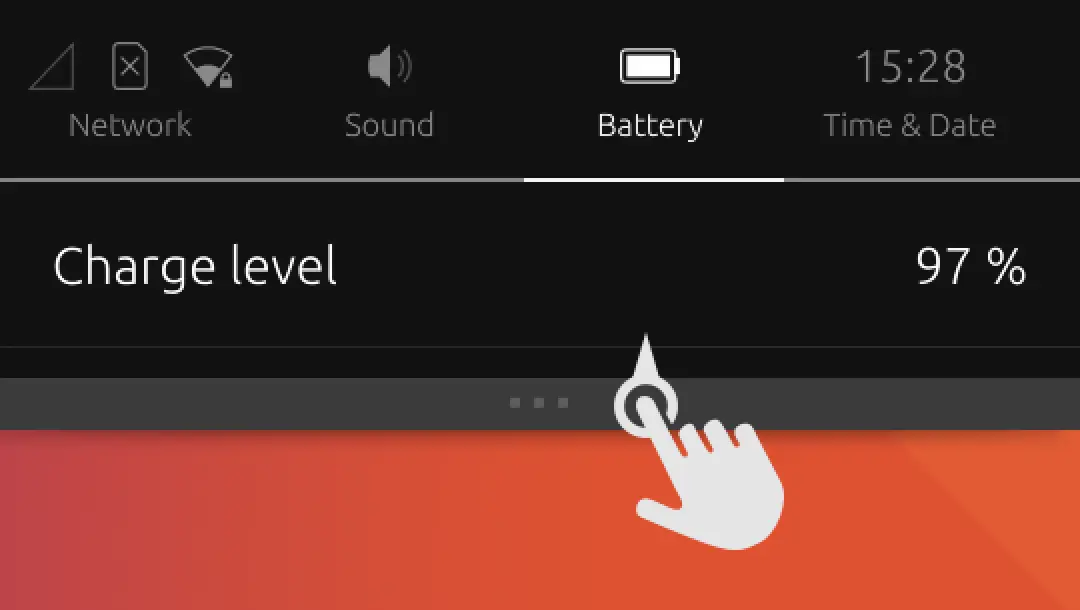
To handle the overflow non-relevant indicators are hidden in closed state. As soon as the opening gesture is started they become visible again and their menus are accessible.
Indicator items expand once the gesture is started. Initial touch position provides a horizontal anchor point around which all expansions happen. This ensures that the target item doesn’t move during the gesture.
Vertical expansion provides space for the label. Expanded item acts as a clear navigation element when indicators are open. Now two unconnected elements from the previous design were combined to one meaningful element.
Horizontal expansion provides space for more robust gesture which was further enhanced with vertical velocity buffering and maximum vertical velocity threshold.
The UX Impact
The new design retained all the good functionality from the old indicators while fixing all usability issues. The new indicator design was user tested multiple times and the results have been significantly better. It fulfilled the stakeholder expectations and also got great feedback from the actual Ubuntu phone users.